
Full disclosure before we start on this journey, I work in product management and until now, have never touched a line of code - save a bit of very old code ‘back in the day’. With the onslaught of AI and the incredible capabilities it presents, I’m keen to learn and see how it helps me both personally and professionally. Essentially this is me creating a bespoke hands on training course using AI as I go.
Having worked with Loveable and Polsia (an agentic platform), I wanted to do this myself. Partly to stress test what can be done with AI acting as your mentor plus learn hands on how code creation and deployment works. With Loveable or Polsia, this is done for you. Read any article on AI and how it impacts people in roles like design, engineering and product - the outcome is always it unlocks knowledge and changes how you operate. This is key.If change is coming, I want to be in control and guiding how it shapes my field, and my role within it. The best way to do this is through working through the process myself.
1. Buying a domain
First step is I wanted the website to be on a specific domain. Somehow no-one had bought benmurr.com, so £9 later through Ionos, it was mine. Ionos is important and we will come back to that later on.
2. Choosing an AI tool
As I’d decided to do this myself, Codex felt more technical and closer to the underlying work of creating code from scratch. Plus I’d heard a lot about it and how it was an incredibly powerful platform. This opened up new experiences for me, with Terminal being a regularly used interface - something I hadn’t used before.
3. Designing the interface
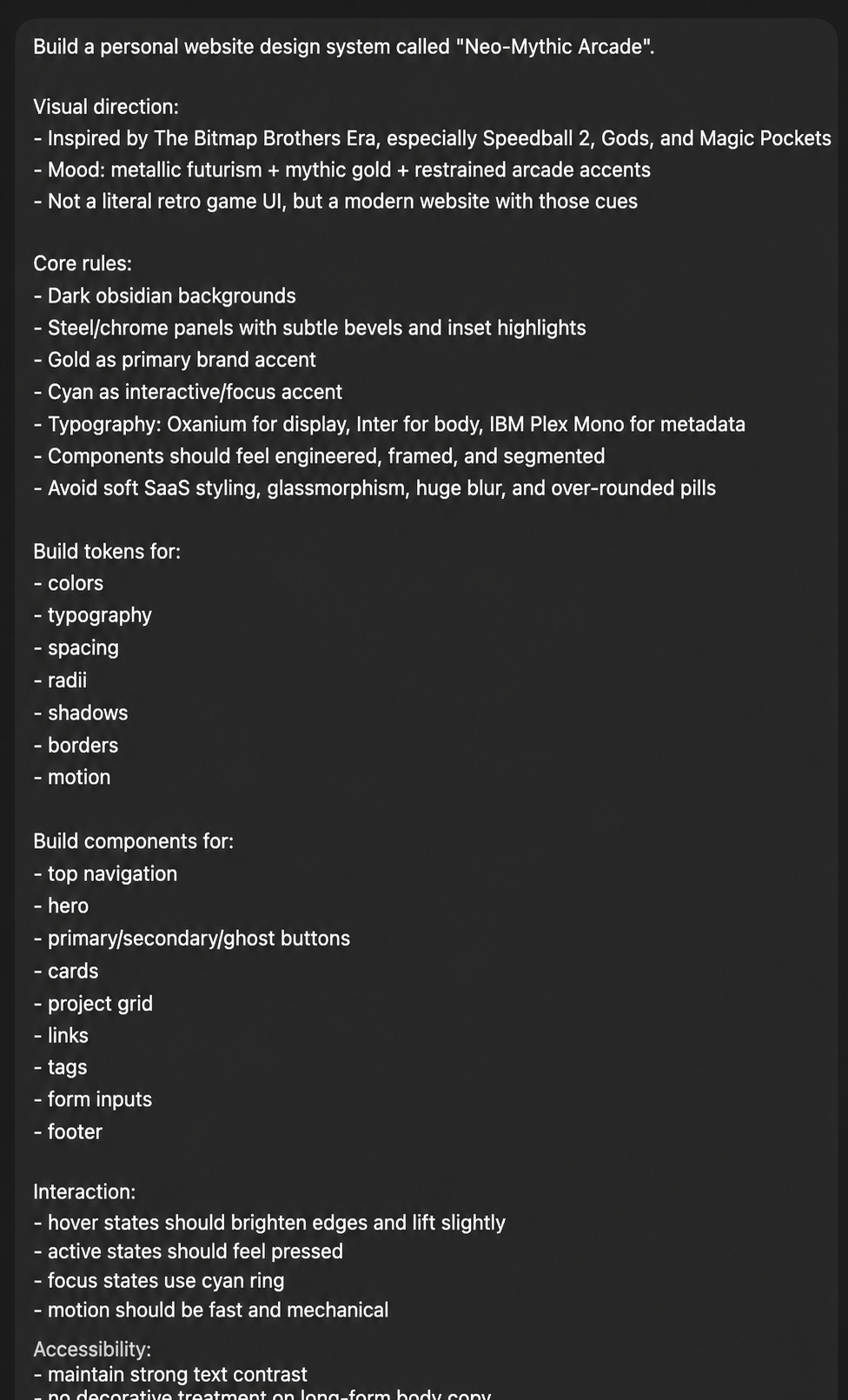
I’m a huge video games fan and my all-time favourite publishing house is The Bitmap Brothers. Their art style was defined and very unique, a modern day interpretation of this was my aim. Usually I’d do this in ChatGPT or Gemini, for this project, I chose Codex to build it from the ground up in code. The key difference here is the preview I’m used to in Loveable isn’t there - it’s different. I also wanted this to be a design system as opposed to simply a button or navigation style. The prompt was simple and used ChatGPT to refine it a little but got Codex to do the actual work:
4. Widening the toolset
The next challenge is then what else I needed bar Codex.There’s a lot. Two critical tools to support the domain are:
- Where to store the code
Having used GitHub before, this was my choice and also that of Codex, requiring creation of a new account. - Where to host it
Vercel was the recommendation, this then required an account setup and also linking it to my newly created GitHub account. Codex led me through the full process end-to-end.
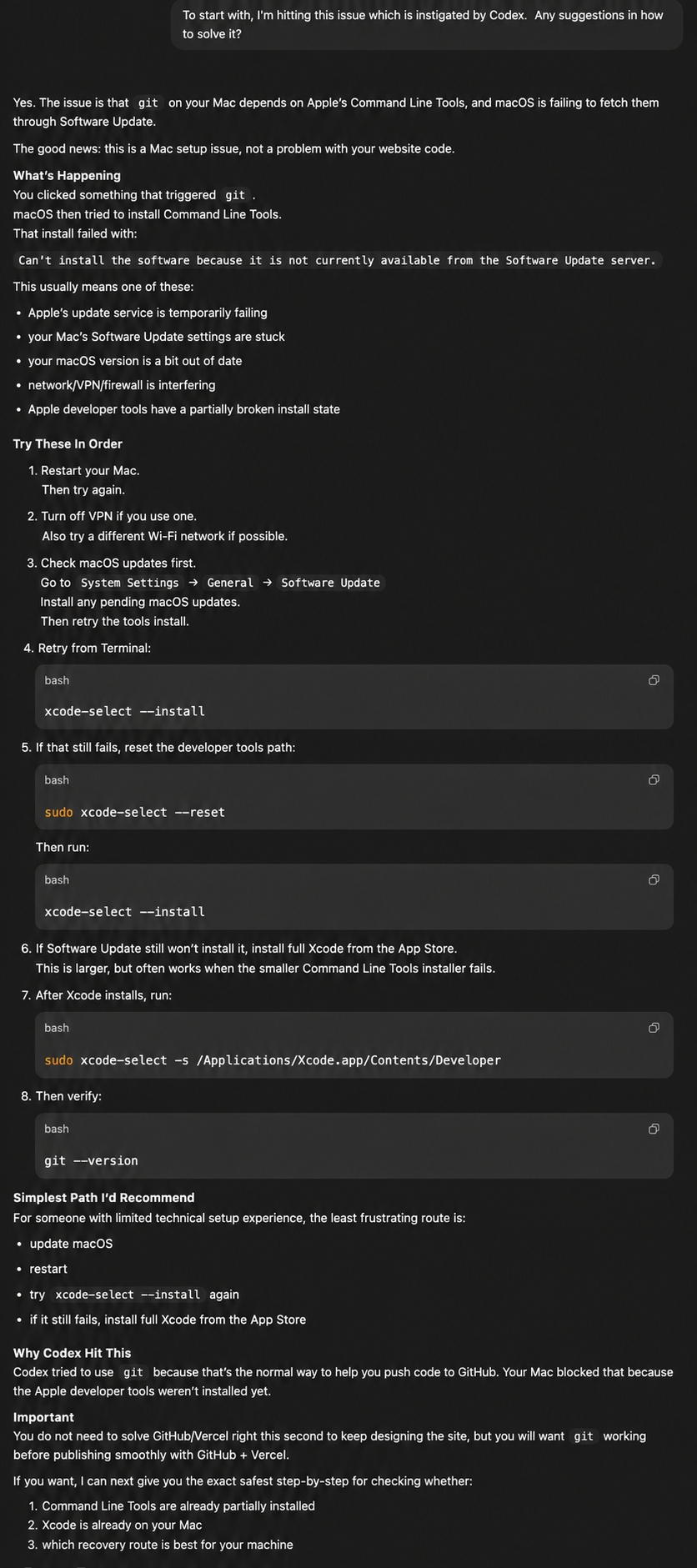
Besides this, my Mac also needed new tooling. Xcode was required and then linking Terminal to the new tools to allow the code to be created on my machine and then pushed to GitHub for Vercel to then pick up and put live. One tip here that I’d recommend for anyone is use Codex as a partner. It will suggest things you don’t know - it has infinite patience and no judgement. I asked it to explain things step-by-step and kept giving it screenshots of every time with questions like ‘Is this looking right’ and ‘there’s multiple choices shown in Terminal, which one is right’. Screenshots are your friend, used it multiple times to check if errors were real or potential fixes down the line. I’d say the setup was the most difficult, multiple steps and working through all of this in Terminal. However Codex was brilliant and at the end confirmed everything was working. Here’s an example of how it helped me when I was hitting an error in Mac OS:
5. Publishing the design system to GitHub
Now everything was set up and the code was in place for the skeleton website, it’s time to get the code into GitHub. As with the previous steps, a lot of Terminal use was required and jumping between Terminal and GitHub’s website. Screenshots, screenshots and screenshots were the order of the day, ensuring I did it right and everything was flowing through correctly. Again Codex walked me through every step.Once the code was in GitHub, next was Vercel to get the code hosted. Very much a repeat of the same process with GitHub, step-by-step guidance and screenshots and before too long, my website was live though on a temporary Vercel domain rather than my own.
6. Launching it on my domain URL
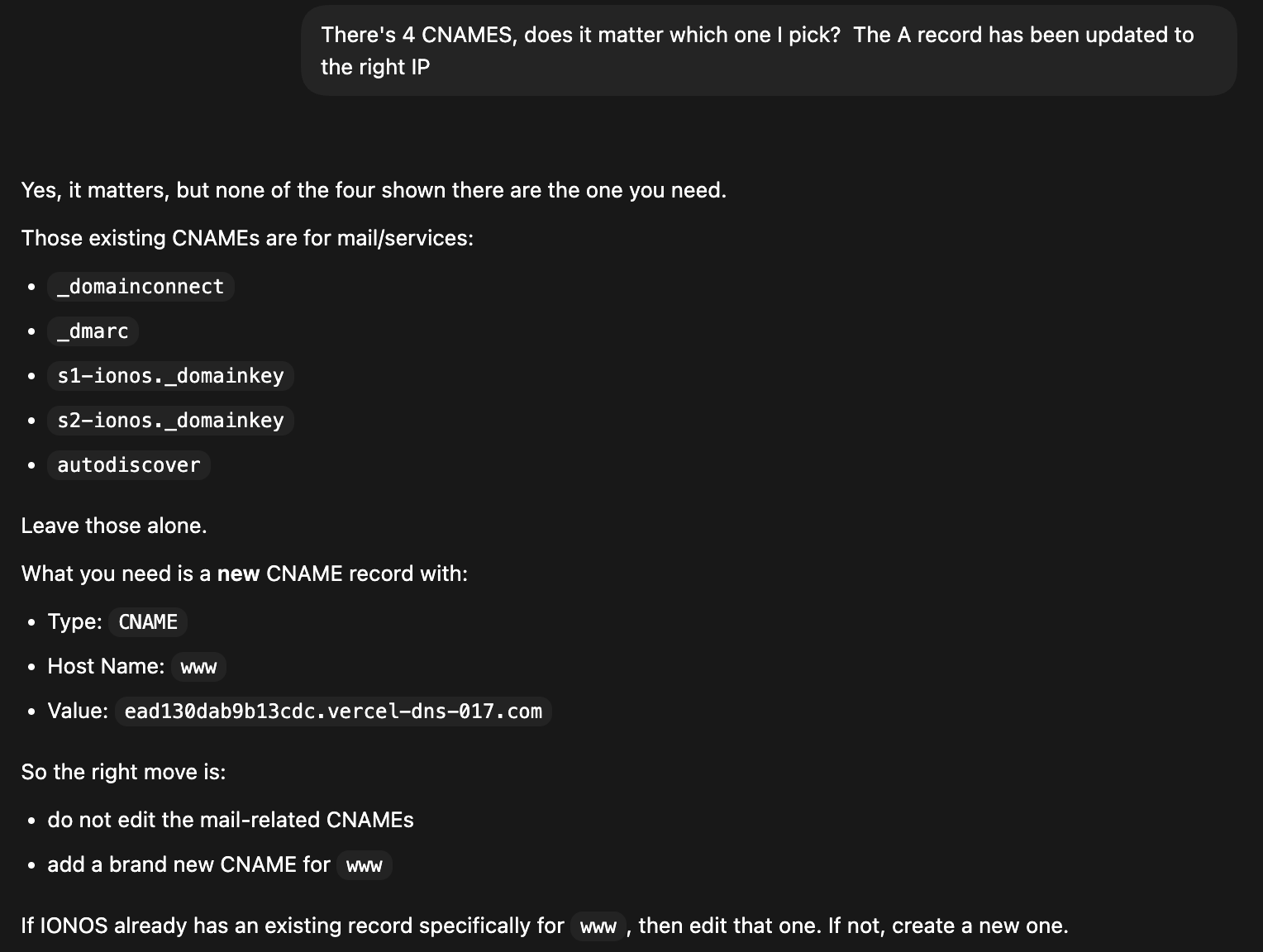
Moving on, the next task is to get the domain off Vercel’s and onto my own one. IP purchasing and configuration is completely new and honestly went into it thinking I’d got the URL and it’s a case of copying in the domain and voila, the website is hosted.It’s far more in depth than that. Codex asked me where I bought the domain from, after confirming Ionos, it then went out and found Ionos’ documentation on integration. Firstly it was into Vercel to configure the domain - first issue was I couldn’t find the option Codex suggested, time for another screenshot and it helped show me where to click. This is so invaluable. Within this I set up both benmurr.com and www.benmurr.com with Codex explaining how to redirect between - something I hadn’t considered before. I also took a screenshot of the final options to ask if it looked right, this validation is so helpful. Once that was done, it was over to Ionos to use the Vercel data to utilise the domain. Here I hit an issue with the options Codex gave me were different to Ionos (relating to CNAME). After a screenshot the direction changed to take a different route by adding a new field.
7. And we’re live
A little patience waiting for the systems to process and feed the code through and I could then click on www.benmurr.com and see the website live. Honestly it was such an exciting moment - from someone who hadn’t touched code to launching a very basic, but still built from scratch, website.
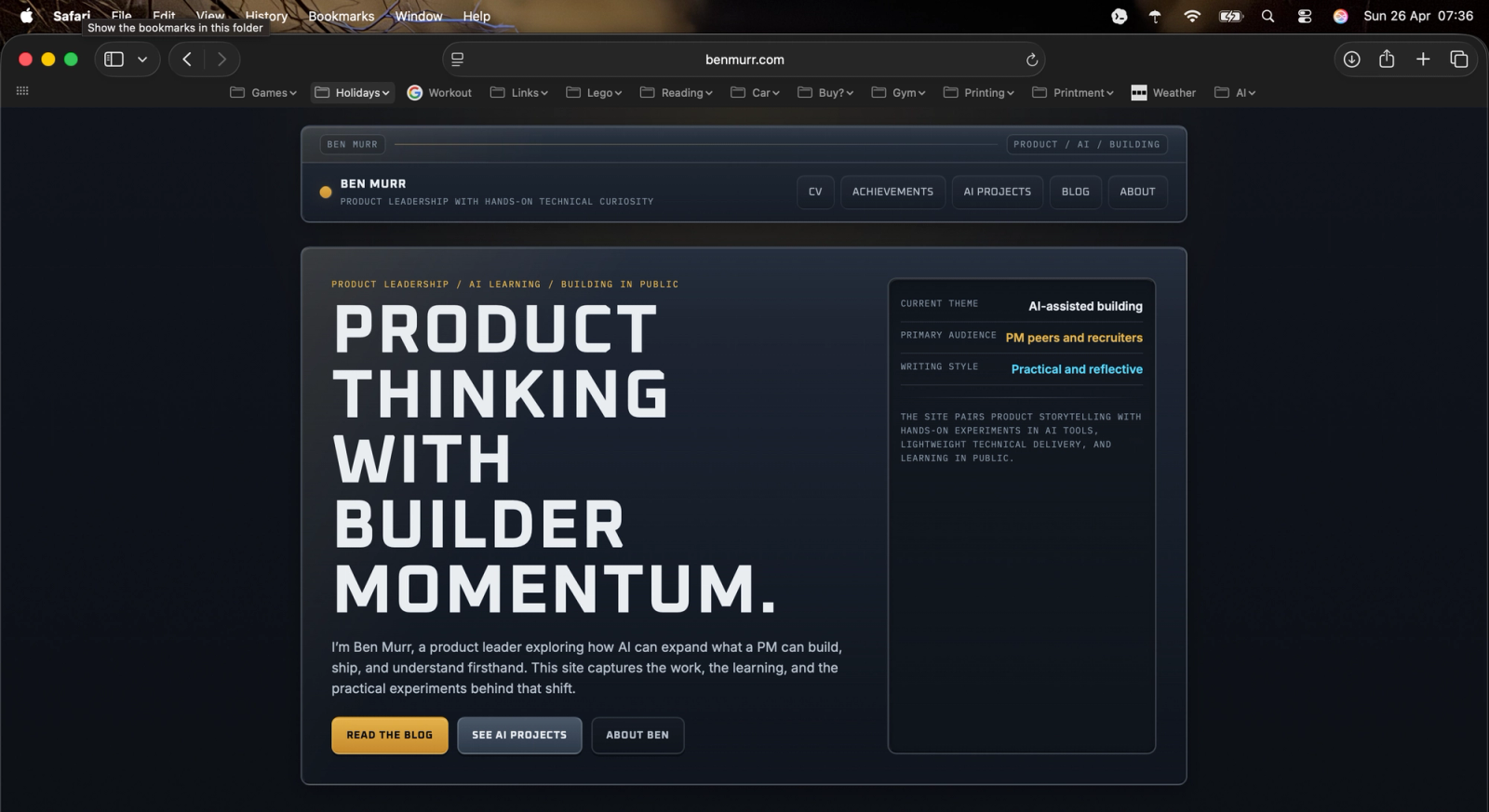
Now work shifts to turning it onto an operational website - initial task will be to implement a basic CMS to allow blog articles to be written without code releases. That’s next on the list.
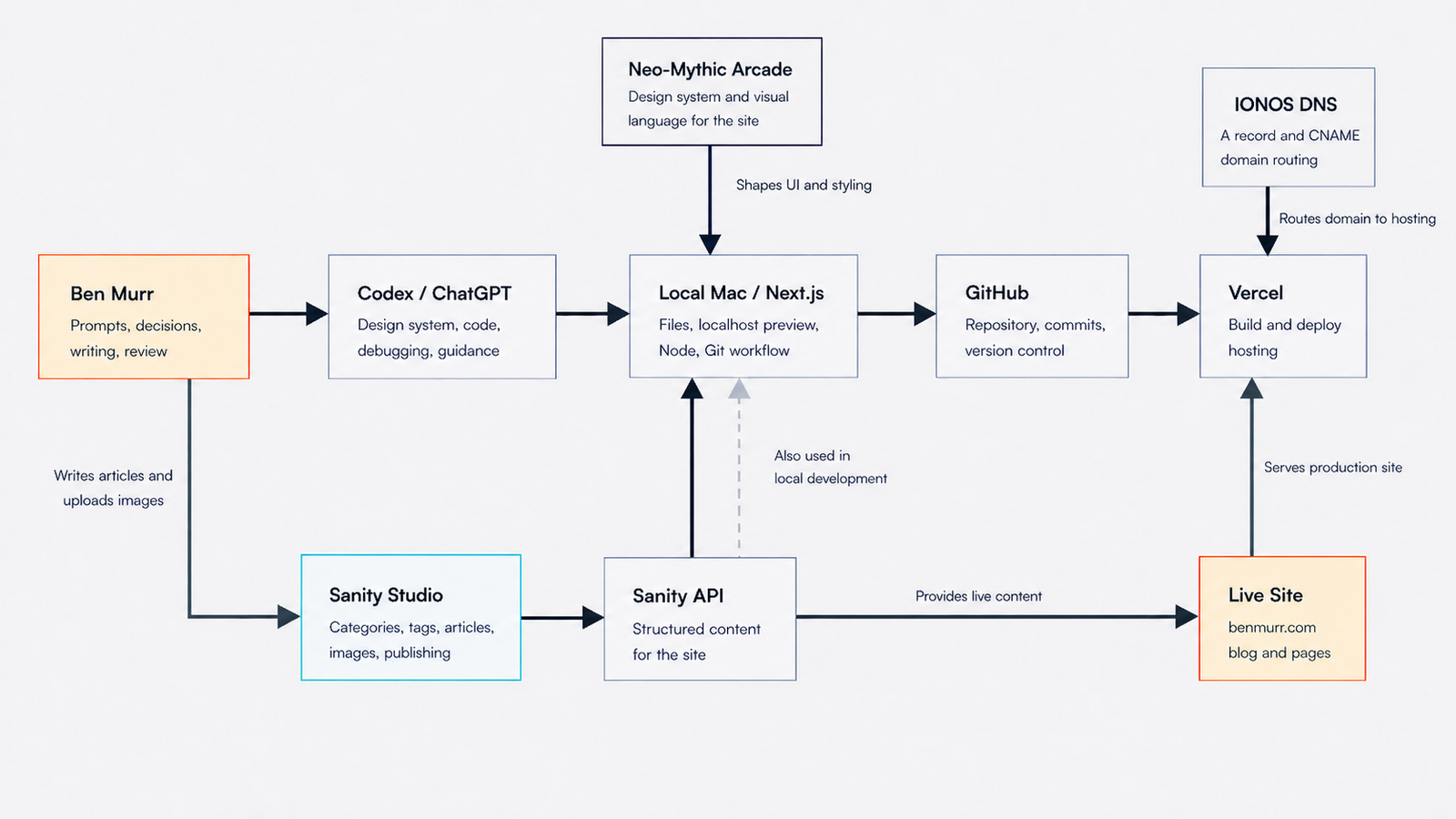
If you’re interested, this is how it all fits together:
Closing thoughts
Writing code may seem scary, with AI being able to explain, repeat in simple terms and act on live messages it is an absolute game changer. Being able to create a website from scratch in a day having no technical hands on skills is something I wouldn’t have thought is possible.
If I’m giving advice, these are the top 4 items that came out as I worked through the process:
- Make AI your partner
- Never feel embarrassed to ask a dumb question or the same one multiple times - AI has infinite patience
- Screenshots are your friend
- Don’t be afraid to change direction or question what is being recommended, it has to be your vision rather than any AI engine
Finally the best type of learning comes from being hands on. Try things, don’t be afraid to break it and adapt as you go.
Lots more to come as I work out how to build wider parts of the website and continue to try different tools. Thanks for reading.